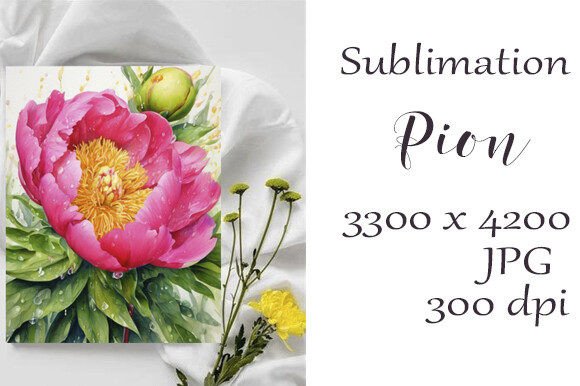
Sublimation Watercolor Peony JPG – A Vibrant Creative Tool
The Sublimation Watercolor Peony JPG is a high-resolution digital image crafted with the soft, flowing beauty of watercolor. This particular file features a stunning pink peony in full bloom, rendered in delicate brushstrokes that evoke warmth and elegance. Designed for both personal and professional use, this image offers versatility and visual appeal for a wide range of creative projects.
What Makes This File Unique?
One standout feature of the Sublimation Watercolor Peony JPG is its 300 dpi resolution at 3300×4200 pixels, making it ideal for printing on various surfaces without losing quality. Whether you're printing on fabric, ceramics, or paper, the clarity and vibrancy remain intact. The file format (JPG) ensures compatibility across most design software and printing platforms, allowing users to work efficiently without unnecessary conversions.
As a handmade watercolor painting, the peony retains an artistic touch that machine-generated graphics often lack. The pink hues vary subtly, adding depth and realism to your designs. This natural variation makes the image perfect for creating unique, personalized items that stand out from mass-produced alternatives.
Where Can You Use It?
This digital asset opens the door to countless applications across different industries and hobbies. Here are just a few areas where it shines:
- Wedding Invitations: Incorporate the peony into your stationery suite for a romantic and elegant touch. Use it as a border element, background texture, or central motif.
- Holiday Cards: Bring seasonal cheer by using the peony in festive greeting cards. Pair it with warm colors or holiday text for a cohesive look.
- Sublimation Products: Print it onto mugs, tumblers, phone cases, and more. The high resolution ensures crisp, long-lasting images after sublimation.
- Fashion and Apparel: Design T-shirts, tote bags, or aprons with the peony for a stylish yet wearable art piece.
- Home Decor: Transform pillows, wall art, or canvas prints into eye-catching home accents with this versatile image.
- Business Branding: Use the peony in logos, branding materials, or product packaging to convey sophistication and creativity.
- Stationery and Office Supplies: Add it to notebooks, calendars, or desk accessories for a fresh, inspiring aesthetic.
Real-World Applications and Examples
Imagine you’re a small business owner launching a new line of floral-themed products. The Sublimation Watercolor Peony JPG can be used as a base design for mugs, keychains, and even clothing. Its pink tones evoke femininity and grace, which could align perfectly with your brand identity.
For educators or bloggers, the image can serve as a visual header for online content about springtime, botanicals, or nature. Its softness adds a welcoming feel to websites and social media posts, enhancing user experience and encouraging engagement.
Freelance designers may find it useful for client projects such as:
- Custom wedding invitations with a hand-painted flair.
- Invitation suites for baby showers or bridal showers.
- Personalized thank-you cards for clients or customers.
- Illustrations for children’s books or educational materials.
In a digital context, this file works well for:
- Email templates with floral accents.
- Backgrounds for presentations or slide decks.
- Social media banners with a subtle, artistic overlay.
- Web headers or landing pages needing a touch of color and class.
Why Choose This Image Over Others?
While many stock images offer similar themes, the Sublimation Watercolor Peony JPG stands out due to its authenticity and adaptability. Unlike vector illustrations or clipart, it has a painterly feel that adds character and charm to any project. It also maintains excellent detail when printed, especially on textured or curved surfaces common in sublimation printing.
Moreover, because it's provided in a Zip folder, you can easily organize and access multiple files if needed. The JPG format ensures quick loading times and broad support across platforms, making it easy to integrate into your workflow without technical hurdles.
Considerations When Using the Image
To get the best results, consider the following tips:
- Color Matching: Since the peony is pink, think about how it will complement other elements in your design. Pair it with neutral tones for a classic look or with bold colors for contrast.
- Printing Surface: Ensure the surface you're printing on is compatible with sublimation techniques. Materials like polyester-coated ceramics, plastics, and fabrics work well.
- Software Compatibility: While JPG files are widely supported, test the image in your preferred design tool before finalizing a project to ensure there are no scaling or formatting issues.
- Resolution Check: Always confirm the output size matches the intended use. Printing on large canvases may require additional resizing or tiling to maintain quality.
Encouraging Creativity Through Sharing
One of the joys of working with digital assets like the Sublimation Watercolor Peony JPG is seeing how others interpret and apply them creatively. The prompt to “Share Your Project Created With This Product” encourages a sense of community and collaboration among creators. Whether it's a custom mug for a loved one or a set of branded notebooks for a company, sharing these results can inspire new ideas and showcase the versatility of the image.
If you’ve ever created something special with this peony design, take a moment to share it. Posting photos of your finished products not only helps others but also gives credit to the original artist behind the beautiful illustration.
Efficiency Meets Aesthetics
For professionals in marketing or graphic design, time is money. The Sublimation Watercolor Peony JPG allows for rapid prototyping and testing of concepts without compromising on visual appeal. Its high resolution means less editing and tweaking, while the ready-to-use format reduces setup time significantly.
Entrepreneurs selling online can benefit from using this image to create cohesive product lines. Think of a collection of kitchenware featuring the same peony design—mugs, plates, and cutting boards that all match seamlessly. Such consistency enhances brand recognition and customer trust.
Final Thoughts on Implementation
When implementing the Sublimation Watercolor Peony JPG into your next project, keep your audience and purpose in mind. For instance, using it in a corporate setting might require toning down the saturation or incorporating it subtly in the background. In contrast, hobbyists might enjoy experimenting with vibrant placements and mixed-media combinations.
Always evaluate the context in which the image will appear. Will it be viewed up close or from a distance? Is it part of a larger pattern or a standalone graphic? These considerations help ensure the peony remains impactful and visually pleasing in every application.
In conclusion, the Sublimation Watercolor Peony JPG is more than just a pretty picture—it's a powerful tool for expression, branding, and creativity. Whether you're designing for a special occasion or crafting everyday items, this image brings a touch of artistry and professionalism to your work. Have you tried using it yet? Don’t forget to share what you've made!